Dun dunnaa duuuuun!
Bunnicus! Silly. Rabbits can't fly...
(I know the animation was a bit choppy- but the point of this was to show animation IN GENERAL is possible!)
---
So a few questions:
Do you currently have Photoshop CS3?
Do you enjoy gifs?
Did you KNOW that you can MAKE gif animations on Photoshop Cs3?
©Influential NonsenseWell! Allow me to teach you how!
First:
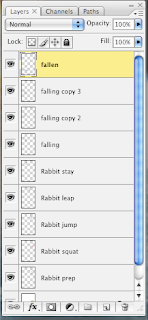
Draw out your animations frame by frame separately: one on each layer. This pile of boxes is my background. The individual frames of the rabbit moving are all on separate layers:
Second: After you've drawn out your frames or
what you want to animate. Go to windows
(I'm using a mac but on a Windows it should be under the same name)
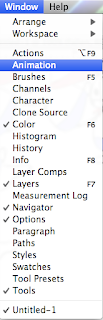
Select
Animation and an
animation window should come up.

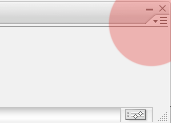
Select the menu tab at the very end of the of the animation window bar:
And Select "Make Frames from Layers".
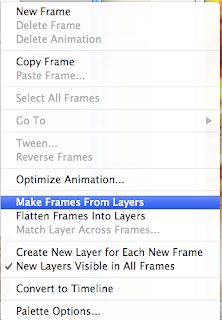
If you don't see that option, look for "Convert to Frame Animation" and then you should be right on track!
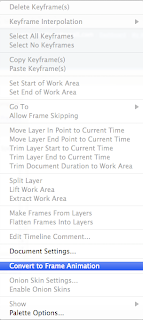
You should be able to see the frames individually and you can edit the lengths of time on each frame:

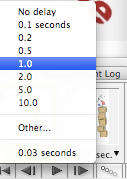
If you're not satisfied
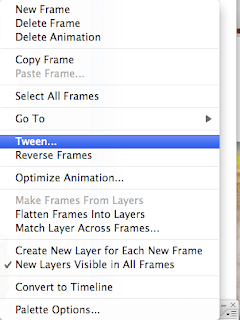
ed with the transition, as in- it's too choppy!
You can go to the same menu on the side (where you selected to change the frames to individual ones) and selected "Tween".
That this does is, it adds more frames and 'makes up' what you're 'missing' in between the two frames. So if you feel the need to smooth out your movements of your animation, selected this.
Once you're finished and satisfied- you can now save it. (If you'd like to preview it before hand, simply hit the 'play' button on the bottom of the animation window:

To save, simply go to file and select "Save for Web & Devices".
Or you can export it as a movie.
On windows, I believe you can simply save it as a .gif.
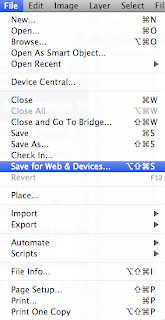
As you save, this prompt will come up:
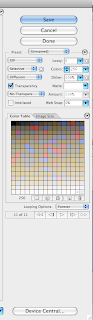
And if you want your animated gif to loop continuously, make sure you SELECT 'Forever'.
And there you have it! Your very own gif.
Good luck!
 Yes it's a small image and it's rather poorly rendered.